Serverless Storage with Knative and Ceph
This post was originally written while I worked at Koor Technologies. Since that website is no longer online, I am republishing that article here.

You’ve probably heard some buzz about serverless computing. Well, the “serverless” part is a metaphor, your functions still run on servers, just like how cloud computing generally involves no water vapor (I’m not aware of any steam-powered data centers). The innovation in serverless computing is allowing developers to write and run short functions (aka lambdas) without knowing a lot about the underlying infrastructure. The function is run by the service provider and developers are usually billed based on the resources used during execution. This model of cloud computing is also known as Function-as-a-Service (FaaS).
Serverless functions are commonly used to develop responsively scalable APIs for websites without the overhead of setting up an infrastructure. They are also used to process external events from services like Twilio, Stripe and Salesforce. Some serverless functions use large machine-learning models stored on external storage. Data processing is another example of using serverless functions, where data like images, videos or logs could go through a pipeline with multiple stages of processing to get the desired result. These pipelines often use a message queue, a PubSub system or some storage between stages. Using storage is preferred when the data exchanged between stages is large.
This blog series explores different options for using storage in Knative, a popular open-source serverless platform.
Knative: Serverless Functions on your Servers
Similar to how you can bring cloud infrastructure to your own data center using OpenStack and Kubernetes, you can bring serverless computing to your own servers. This migration back to local cloud services could be motivated by cost or by business needs to keep data and computation partially or fully separated from the public cloud.
One popular platform to run serverless workloads is Knative, which runs on Kubernetes and is used in Google Cloud Run. Knative is built on Kubernetes, which allows it to be platform-agnostic and easily scalable.
Knative consists of two main components: Serving and Eventing. Knative Serving manages the serverless workload as containers in Kubernetes and handles routing and scaling. Knative Eventing is a collection of APIs that allow using event-driven architecture with serverless applications.
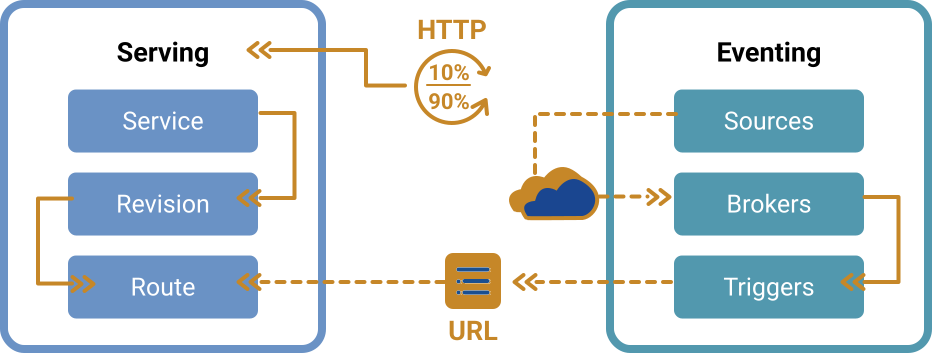
used under CC BY 4.0 and recolored
Many applications of serverless architecture, like image and video processing, require access to storage to store inputs, outputs or intermediate objects. When using AWS Lambda as a serverless platform, the general wisdom is to use AWS S3 or AWS EFS. Since Knative is based on Kubernetes, it is natural to think about managing storage in Kubernetes too - away from the costs associated with the public cloud. This is where Rook Ceph shines.
This first part of the series walks through installing Knative on a Kubernetes Cluster and attaching Ceph storage to functions. It uses an example of a file processing pipeline with a producer and a consumer.
Prerequisites
You need to have a working Kubernetes cluster that meets the minimum requirements of both Rook and Knative. This tutorial uses Rook v1.13.0 and Knative v1.12.0 . This is a summary of the requirements for a production cluster:
- Kubernetes v1.26 or newer.
- At least three nodes, each having at least 2 CPUs, 4 GB of memory, and 20 GB of disk storage.
- Raw devices / partitions / logical volumes
We ran this using our demo cluster, which we set up using Terraform and Kubeone on Hetzner Cloud. All the code is available on GitHub.
Installing Knative
There are many ways to install Knative as described in the docs. The easiest in my opinion is to use the Knative Operator:
kubectl apply -f https://github.com/knative/operator/releases/download/knative-v1.12.2/operator.yaml
To install Knative Serving, create the following yaml file specifying the KnativeServing custom resource:
# serving.yaml
apiVersion: v1
kind: Namespace
metadata:
  name: knative-serving
---
apiVersion: operator.knative.dev/v1beta1
kind: KnativeServing
metadata:
  name: knative-serving
  namespace: knative-serving
spec:
  ingress:
    kourier:
      enabled: true
  services:
    - name: kourier
      # Override annotations for the kourier service
      annotations:
        # A provider-specific annotation is necessary to access the functions using a load balancer
        # For Hetzner it is:
        load-balancer.hetzner.cloud/name: "my-load-balancer"
  config:
    domain:
      "your-subdomain.example.com": "" # Replace with your domain if you would like to expose the service
    network:
      ingress-class: "kourier.ingress.networking.knative.dev"
    features:
      kubernetes.podspec-persistent-volume-claim: "enabled"
      kubernetes.podspec-persistent-volume-write: "enabled"
      kubernetes.podspec-securitycontext: "enabled"
The last three lines are required because accessing persistent volume claims from Knative functions is not enabled by default, and you need to enable that using a feature flag. We also need the security context feature flag to change volume permissions, see below.
kubectl apply -f serving.yaml
Installing Knative Func
Knative func is a CLI that makes it easy for users to create and deploy functions as Knative Services. You can install it using Homebrew or from GitHub releases.
wget -O func https://github.com/knative/func/releases/download/knative-v1.12.0/func_$(go env GOOS)_$(go env GOARCH)
chmod +x func
sudo mv func /usr/local/bin
func version
Installing Rook Ceph
Installing Rook using Helm is pretty straightforward. First, you need to grab the helm repository and install the Rook-Ceph operator. The default values are pretty solid, so you might not need to specify a values.yaml file.
helm repo add rook-release https://charts.rook.io/release
helm repo update
helm install --create-namespace --namespace rook-ceph rook-ceph rook-release/rook-ceph -f values.yaml
After that, we need to install the Rook Ceph cluster. Again, the default values are very sane, and they create a CephFS storage class called ceph-filesystem, which is what we will use to create a PersistentVolumeClaim later.
helm install --namespace rook-ceph rook-ceph-cluster \
   --set operatorNamespace=rook-ceph rook-release/rook-ceph-cluster -f cluster-values.yaml
After a while, Rook should be ready. To check Ceph health, you can use the Rook toolbox or the Rook kubectl plugin:
$ kubectl exec -n rook-ceph -it deploy/rook-ceph-tools -- ceph status
  cluster:
    id:     6a7e98c9-521f-4e2a-a0c3-f9433910c07f
    health: HEALTH_OK

  services:
    mon: 3 daemons, quorum a,b,c (age 10d)
    mgr: b(active, since 116s), standbys: a
    mds: 1/1 daemons up, 1 hot standby
    osd: 3 osds: 3 up (since 4w), 3 in (since 8w)
    rgw: 1 daemon active (1 hosts, 1 zones)

  data:
    volumes: 1/1 healthy
    pools:   12 pools, 185 pgs
    objects: 447 objects, 149 MiB
    usage:   1.7 GiB used, 88 GiB / 90 GiB avail
    pgs:     185 active+clean

  io:
    client:   853 B/s rd, 1 op/s rd, 0 op/s wr
Let’s write some code! 🧑💻
To simulate a data pipeline, we will use two functions that share a CephFS volume. The producer function creates a file with random data in storage, and the consumer function chooses a file, checks its md5 then deletes it. We also have a function that lists the files in storage to track progress. A real data pipeline could consist of multiple stages of more sophisticated processing, like machine learning, video filters, or data aggregators.
First, we create the PersistentVolumeClaim:
# pvc.yaml
apiVersion: v1
kind: PersistentVolumeClaim
metadata:
  name: knative-pc-cephfs
spec:
  accessModes:
    - ReadWriteMany
  resources:
    requests:
      storage: 11Gi
  storageClassName: ceph-filesystem # This is the CephFS storage class we created earlier
kubectl apply -f pvc.yaml
Then, we create the functions. We will use Golang for our example, but you can choose any of the supported languages.
$ func create -l go producer
Created go function in /path/to/producer
$ tree producer -a
producer
├── .func
├── .funcignore
├── func.yaml
├── .gitignore
├── go.mod
├── handle.go
├── handle_test.go
└── README.md
$ func create -l go consumer
Created go function in /path/to/consumer
$ func create -l go list
Created go function in /path/to/list
We can now add the PVC we created earlier to each of the functions. Use this command then follow the prompts to add knative-pc-cephfs as a volume. The mount path is where your function will be able to access the volume, in this case, it is /files.
cd producer
func config volumes add
Doing this adds the following lines to your func.yaml:
# producer/func.yaml
run:
  volumes:
    - presistentVolumeClaim:
        claimName: knative-pc-cephfs
      path: /files
We can now access the CephFS storage like any directory. This is the producer function for example:
// producer/handle.go
package function

import (
	"context"
	"crypto/md5"
	cryptoRand "crypto/rand"
	"fmt"
	"math/rand"
	"net/http"
	"os"
)

const FILES_DIR = "/files"

// Handle an HTTP Request.
func Handle(ctx context.Context, res http.ResponseWriter, req *http.Request) {
	// Generates a file between 5 and 15 MB
	fileSize := (rand.Intn(10) + 5) * 1000_000
	fmt.Printf("Generated file size will be %d", fileSize)

	fmt.Println("Generating random bytes")
	contents := make([]byte, fileSize)
	generatedSize, err := cryptoRand.Read(contents)
	if err != nil {
		res.WriteHeader(http.StatusInternalServerError)
		fmt.Println(err)
		fmt.Fprint(res, "Error generating random data")
		return
	}
	fmt.Printf("Generated %d random bytes", generatedSize)

	md5sum := md5.Sum(contents)
	fmt.Printf("The md5 sum is %x\n", md5sum)

	fileName := fmt.Sprintf("%x.bin", md5sum)
	filePath := FILES_DIR + "/" + fileName
	fmt.Printf("Writing file %s\n", fileName)
	err = os.WriteFile(filePath, contents, 0666)
	if err != nil {
		res.WriteHeader(http.StatusInternalServerError)
		fmt.Println(err)
		fmt.Fprintf(res, "Error writing to file %s", fileName)
		return
	}
	fmt.Printf("Wrote file %s\n", fileName)

	fmt.Fprintf(res, "Produced file %s \nFile size is %d \nThe md5 sum is %x", fileName, fileSize, md5sum)
}
You can find the full code for all the functions on our GitHub repository.
Building and Deploying 🛠️
Now we are ready to build and deploy these functions. Replace docker.io/<your_username> with your registry.
cd producer
func build --registry docker.io/<your_username>
func deploy

# this is to fix permission issues
kubectl patch services.serving/producer --type merge \
    -p '{"spec": {"template": {"spec": {"securityContext": {"fsGroup":1000}}}}}'
That last command is needed because of a mismatch in user permissions for the attached volume. A GitHub issue was raised to the knative team to address that. Deploy the other functions similarly, replacing producer in the last command with the name of the function.
Let’s Run This! 🚀
Now that the function is deployed, we can invoke it using func invoke. This is the result of invoking the producer function:
$ func invoke
Produced file 4f55c654d31edfe1362879a31c815076.bin
File size is 12000000
The md5 sum is 4f55c654d31edfe1362879a31c815076
Alternatively, we can invoke a function using an http request to the url returned by func deploy. This uses the subdomain defined when installing Knative Serving. For example, this is the result of running the list and consumer functions:
$ curl http://list.default.knative-staging.koor.tech
Found 1 files
- 4f55c654d31edfe1362879a31c815076.bin
$ curl http://consumer.default.your-subdomain.example.com
Consumed file 4f55c654d31edfe1362879a31c815076.bin
File size is 12000000
The md5 sum is 4f55c654d31edfe1362879a31c815076
When you’re done with a function, you can delete it using func delete
$ func delete consumer
Removing Knative Service: consumer
Removing Knative Service 'consumer' and all dependent resources
Rook Ceph is an excellent match for Knative
As we’ve seen in this tutorial, setting up Knative with Rook Ceph as a storage provider is easy. Both tools use Kubernetes as a substrate which means you can save resources by running both of them on the same cluster. You can also use the Ceph CSI driver to connect to Ceph storage on a different cluster.
Stay tuned for the next part in this series where we use the Ceph S3 API with Knative.
Enjoy Reading This Article?
Here are some more articles you might like to read next: